MASATIO · OPERATIONS SOFTWARE
Know where every tool is, and when it is due.
Keep QR-labeled equipment, calibration, rentals and stock across warehouses, vans and job sites organized in one system.
Looking for CRM or ERP integrations? Explore Masatio business solutions.
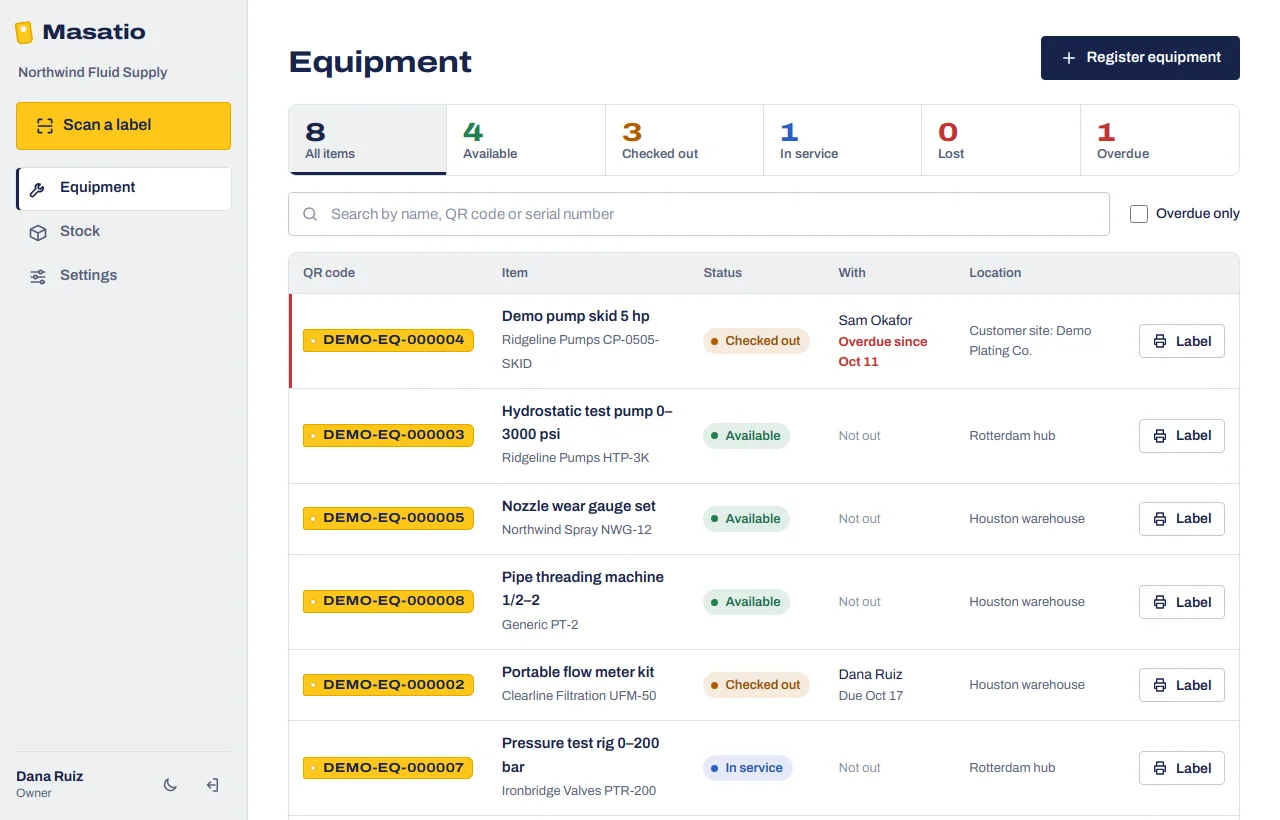
Equipment & stock tracking.
Every item your team lends out gets a QR tag. Anyone scans it with a phone to check it out or back in, and you see what is out, with whom, and what is overdue.
- 1
Tag it
Register an item or import your Excel list. Masatio gives each one a code; print the label and stick it on. Labels you already use can keep their codes.
- 2
Scan it out and back
A technician scans the tag, picks who takes it, the project and the due date. On return they note the condition; damaged items go straight to service.
- 3
See what is out
One list shows every item by status, who has it and when it is due. Overdue items are flagged, and you can filter to them in one click.
Every item by status, who has it and where it is. Overdue returns are flagged in red.
- Check-out with due dates
- To a person and a project. Technicians do not need a login of their own.
- Stock in every location
- Receive, issue, transfer and count. Reorder levels flag what to buy.
- Works without signal
- Scans in a basement or a yard are kept on the phone and sent when it is back online.
- Bring your Excel lists
- Pick the file as it is. Masatio matches the columns, checks every line, and a file with a problem changes nothing until it is fixed.
- Roles for everyone
- Owners, admins, managers, operators and viewers each see and change only what they should.
- Your units and currency
- Imperial or metric, US dollars, euros, pounds and more. Each company keeps its own settings.
- Calibration dates
- Each item carries its next calibration or service date. Overdue items warn before they go out, and recording a calibration moves the date on.
- A Monday email
- Managers get one email a week: overdue returns, calibration due in the next two weeks, stock below its reorder point. Quiet weeks send nothing.
- A weekly operations brief
- For rental fleets, the Monday email opens with this week at a glance: rent earned in the last 30 days and how it moved, fleet utilization, items idle for 30 days and the monthly rent they could bring in, items held back by a lapsed calibration, top customers and damaged returns. Every figure is calculated from your own records.
- Labels by the sheet
- Print every new item's QR label at once on Avery-style sticker sheets, Letter or A4, or on plain paper with cut lines.
Equipment management beyond spreadsheets.
Most small teams run their equipment from a spreadsheet, a whiteboard and memory. Here is what changes.
| Question | Spreadsheet and whiteboard | With Masatio |
|---|---|---|
| Who has the laser level? | Ask around, check the whiteboard, call the site. | Scan the label or search: the name, the project and the due date. |
| Overdue returns | Noticed when someone else needs the item. | Flagged in red the day they are late, and listed in Monday's email. |
| Calibration | A sticker on the tool that nobody reads before it goes out. | A warning before check-out, and two weeks' notice by email. |
| Stock in vans and sites | Counted at month end, if at all. | Every receive, issue and transfer recorded per location. |
| Rented equipment | Days out worked out from a notebook at billing time. | Rent so far on screen; billing and delivery notes ready. |
| Who changed what | Unknown. | Every check-out, return and edit kept with the person and time. |
A week with Masatio.
What it looks like at a distributor with two warehouses, a van and four technicians. An example, not a customer story.
- Mon 9:00
The weekly email arrives
Rent is up on last month, four compressors have sat idle for 30 days, two returns are late, one pump needs calibration next week, filter cartridges are low.
- Tue 7:30
A technician scans a pump out
To himself and the Harbor Street job, due back Friday. No login of his own needed in the yard: the foreman's phone does it.
- Wed 14:00
A return comes back damaged
Scanned in as damaged; it goes straight to service instead of back on the shelf.
- Thu 11:00
The lab calibrates the test pump
Recorded in one click; the next date moves on a year and the warning clears.
- Fri 16:30
Stock moves to the van
Twenty cartridges move from the warehouse to the van, so both counts stay right.
Security and your data
What we do to keep your company's records safe, and what happens to them if you leave.
- Each company kept apart
- Every record carries its company, every request is checked against it, and the database itself refuses a link between two companies' records.
- Encrypted
- Only HTTPS connections are accepted. The database and its backups are encrypted at rest by Microsoft Azure, in the European Union.
- Careful sign-in
- Passwords are stored only as salted hashes, and sign-in and reset links only as hashes. Repeated sign-in attempts are limited.
- Roles and a full history
- Owners, admins, managers, operators and viewers each get only what they need. Every check-out, return and change is recorded with who did it and when.
- Automatic backups
- The database can be restored to any minute of the last 7 days. We confirm every week that backups are there.
- Your data stays yours
- We never sell it or use it for ads. Ask any time for your lists as Excel files; after you cancel we keep them 60 days, then delete them. See the terms.
Equipment & Stock pricing
One monthly price per company, in US dollars. Every plan has every feature: QR labels, offline scanning, calibration, rentals, stock and the Monday alert email. Start with 14 days free, no card needed.
-
Starter
For a small team with one yard or warehouse.
$29per month
or $290 a year, two months free
- Up to 250 tracked items
- Up to 5 people signing in
-
Recommended
Team
For several crews, sites or branches.
$79per month
or $790 a year, two months free
- Up to 1,000 tracked items
- Up to 15 people signing in
-
Business
For larger fleets and rental houses.
$199per month
or $1,990 a year, two months free
- Unlimited items
- Unlimited people
- We import your lists for you
Prices exclude sales tax and VAT. After the trial, pick a plan and we invoice monthly or yearly. Cancel any time: you keep access until the end of the period you paid for, and part-periods are not refunded (terms). Need more than one company, or a price in euros or pounds? Ask us. The Sales CRM is priced separately.
Questions
Do my technicians need an app or an account?
No. Masatio runs in the phone's browser and can be added to the home screen. Technicians who only take equipment out are names on a list; only the people who scan need to sign in.
We already have labels on our equipment. Do we have to re-label?
No. Put your existing codes in the import file and Masatio uses them. New items get Masatio codes and printable labels.
What happens when there is no signal?
The phone keeps the scan and sends it when it is back online. If someone else changed the item in the meantime, Masatio tells the person instead of guessing.
Can we run more than one company or branch?
Yes. One sign-in can belong to several companies, and each one keeps its own lists, settings and QR codes.
Can we use the Sales CRM without equipment tracking?
Yes. Every module can be bought on its own. The Sales CRM has its own page and demo.
What do we need to start?
Your equipment or stock list in Excel, a label printer or plain sticker paper, and the phones your team already carries.
Talk to our team
Looking for a product demo, an integration or a custom solution? Tell us what your team needs and we will help define the right next step.
- Product demos. Explore working solutions using sample data.
- Project scoping. Share your current software and the workflow you want to improve.
- A reply within one working day. Or write to info@masatio.com.