Every visit in the field, on your desk as it happens.
Your reps log visits, calls and quotes from their phones. You see weekly targets, won and lost quotes, the reasons you lose, and each customer's open balance on one screen.
Ready for logistics companies, set up for other industries. Nothing to install: it runs in the browser and on phones.
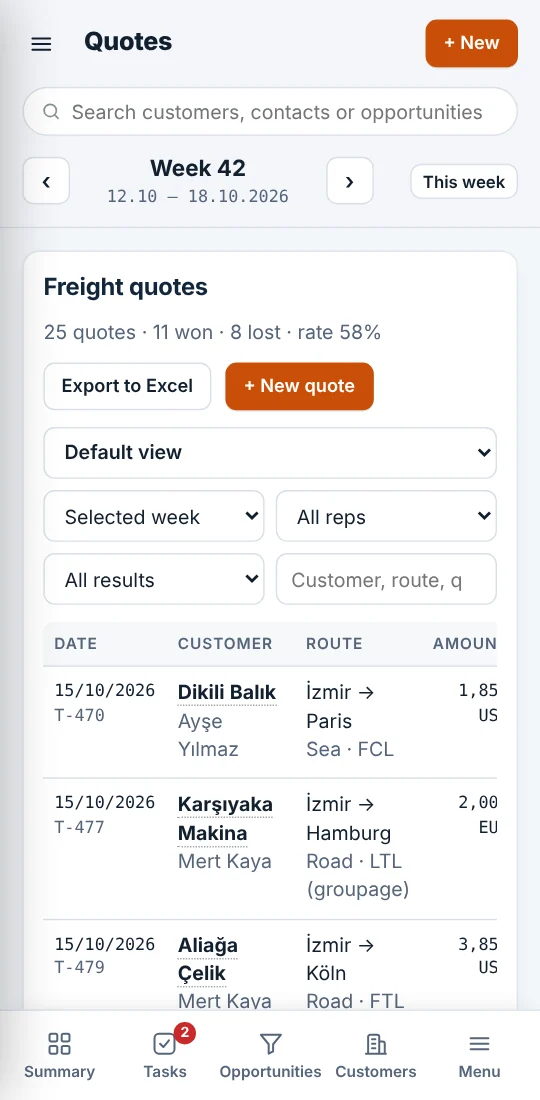
Know why you lose the quotes you lose.
Every lost quote closes with a reason; it can't be saved without one. Within a few weeks you can see whether price, transit time or late quotes are costing you business.
Loss reasons
all time- Price too high22
- Customer stayed with current provider11
- Transit time too long6
- Quote sent too late5
- Payment terms didn't match4
- No truck / equipment available4
A sales week, inside the CRM
Reps log in the field, the app reminds them to follow up, and the manager finds the numbers ready on Monday morning.
- Mon
A visit is logged
The rep records the meeting from their phone: who they met, what was said, the next step. They set a follow-up date.
- Wed
A quote goes out
Route, transport mode and amount. The quote is linked to an open opportunity, which moves along the pipeline.
- Thu
The follow-up comes due
Due follow-ups show as a red count on Tasks. Anything overdue is listed on the summary screen.
- Fri
The quote closes
Won or lost. A lost quote can't be saved without a reason; add the competitor's price and the gap shows up.
- Next Mon
The manager opens the summary
Targets, quotes, win rate and loss reasons per rep. The weekly meeting's numbers are ready.
Screens
From the app, running on sample data. The same records on desktop, tablet and phone.
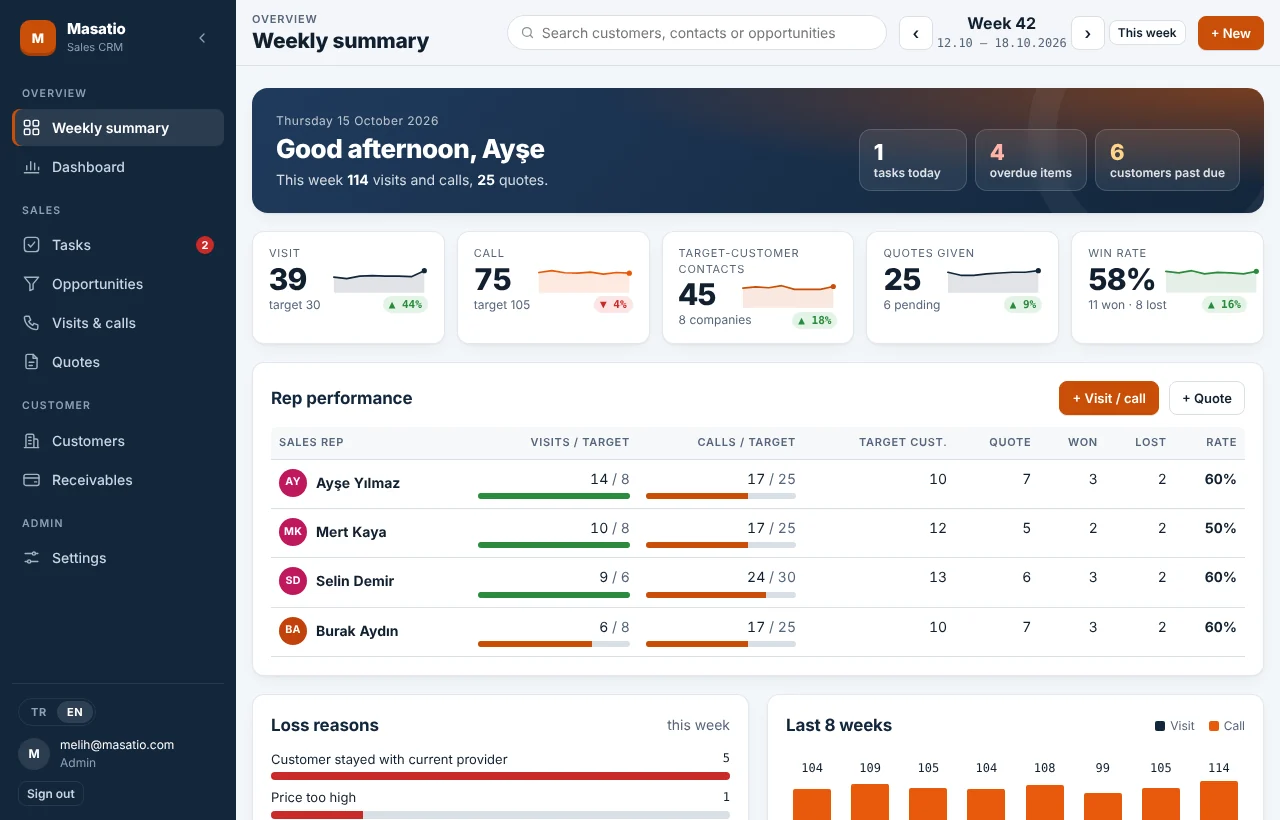
Where the week stands against target, who is behind and what is overdue, on the first screen you open.
What's in it
- Weekly targets and summary
- Every rep has weekly visit and call targets. The summary also shows the change from last week.
- Pipeline
- Track deals stage by stage before they become quotes. A lost opportunity needs a reason too.
- Tasks and calendar
- Call-backs, samples, quote prep. Today's and overdue tasks show as a count.
- Balances and due dates
- Upload the balance report from your accounting software as Excel. Reps see overdue amounts before a visit.
- Roles
- Reps see only their own records and customers. Managers see everyone and manage the settings.
- English and Turkish
- Each user picks their language. Records stay shared, so teams in different countries work from the same data.
- Product catalog
- Your products and services with list price, unit and currency. Reps pick from the list when they write a quote instead of retyping figures.
- Quotations
- Your company details, validity period and standard terms come from settings. Print the quotation or send it to the customer as a PDF.
- Works like an app on phones
- Add it to the home screen and it opens full screen. Reps log a visit as they leave the customer's door.
Set up for your industry
Visits, calls, customers and balances work the same everywhere. Quote fields and loss reasons come set for your business.
Logistics and freight
Freight quotes with transport mode, load type, origin, destination and competitor price. Loss reasons cover transit time, equipment and payment terms.
ReadyDistributors, manufacturers, services
Quotes for catalog products or services with quantity, unit price and currency, plus the quotation the customer receives. Loss reasons cover price, lead time and stock.
ReadyBuilt around you
Need a field, list or report that is specific to your business? We add it. Automatic imports from your accounting software can be set up.
Custom
How to start
- 1
Talk to us
In 20 minutes we go through how your sales team works today and what you want to track.
- 2
We set it up for you
The app opens under your company's name on your own domain. We import your customer list from Excel.
- 3
Your team starts the same day
Reps add the app to their phone's home screen. Every entry appears on everyone else's screen instantly.
Let's plan your Sales CRM walkthrough.
Share a few details about your company and team. We'll show you Sales CRM using fictional sample records, not your customer data.
Prefer email? info@masatio.com